Category: Virtualization

1

VMware vSphere 7: Which Features Are Removed?

VMware vSphere 7 introduces lot of new features but there are some features which removed or deprecated in VMware vSphere 7. Some of them were important features for us but VMware has defined some policies to achieved new and updated solutions in server/desktop/OS Level virtualization.

0

HPE FlexFabric 650FLB Adapter May Cause PSOD on ESXi 6.x

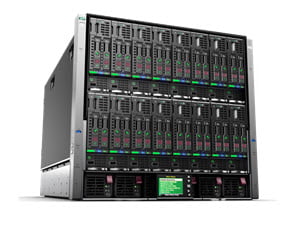
Seems, there is an issue on HPE Blade Servers when a specific adapter is installed on server. If there is any server of the below models in your virtual environment that you should consider to this post: HPE ProLiant BL460c Gen10 Server Blade HPE ProLiant BL460c Gen9 Server Blade HPE ProLiant BL660c Gen9 Server HPE servers running VMware ESXi 6.0, VMware ESXi 6.5 or VMware ESXi 6.7 and configured with an HPE FlexFabric 20Gb 2-port 650FLB Adapter with driver version 12.0.1211.0 (or prior), a “wake NOT set” message is logged in the Vmkernel logs. Then after 20 to 30 days of server run time, a Purple Screen of Death (PSOD) may display a brcmfcoe: lpfc_sli_issue_iocb_wait:10828 message. The following errors are displayed in the VMkernel logs after approximately 50 to 70 days of server run time: 2019-07-20T00:46:10.267Z cpu33:69346)WARNING: brcmfcoe: lpfc_sli_issue_iocb_wait:10828: 0:0330 IOCB wake NOT set, Data x24 x0 2019-07-20T01:10:14.266Z cpu33:69346)WARNING: brcmfcoe: lpfc_sli_issue_iocb_wait:10828: 0:0330 IOCB wake NOT set, Data x24 x0 2019-07-20T02:16:25.801Z cpu33:69346)WARNING: brcmfcoe: lpfc_sli_issue_iocb_wait:10828: 0:0330 IOCB wake NOT set, Data x24 x0 2019-07-20T02:22:26.957Z cpu33:69346)WARNING: brcmfcoe: lpfc_sli_issue_iocb_wait:10828: 0:0330 IOCB wake NOT set, Data x24 x0 2019-07-20T03:26:39.057Z cpu11:69346)WARNING: brcmfcoe: lpfc_sli_issue_iocb_wait:10828: 0:0330 IOCB wake NOT set, Data x24 x0 2019-07-20T04:06:46.158Z cpu11:69346)WARNING: brcmfcoe: lpfc_sli_issue_iocb_wait:10828: 0:0330...

kubewise 1

Kubewise, Multi-Platform Desktop Client for Kubernetes

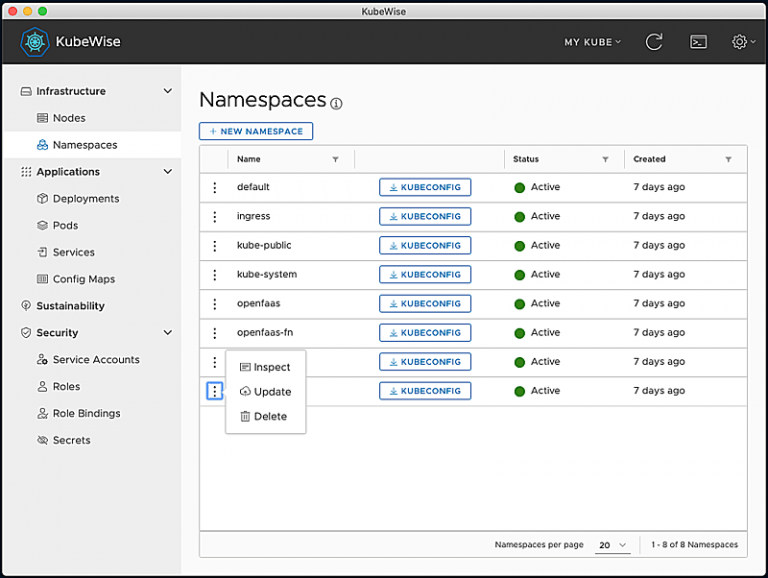
Kubewise is a simple multi-platform desktop client for Kubernetes. In the same way the kubectl command requires only a valid kubeconfig file to run commands against a Kubernetes cluster, Kubewise requires you just to configure one or more valid kubeconfig files to interact with the corresponding Kubernetes clusters. Main features: Support for multiple kubeconfig files. UI-driven interaction with the most frequently used Kubernetes entities. One-click terminal with the proper KUBECONFIG env variable set. Generation of custom kubeconfig files for a given namespace. Highlight sustaniability and security-related data. Requirements Kubewise is a desktop application built with HTML, JavaScript, CSS and Node.js, and it runs on Electron, a framework for building cross platform apps using web technologies. So for running it, basically, all you need is: Any modern macOS, Windows or Linux (Debian-based) OS. kubectl v1.14.0+ installed to access Kubernetes v1.14.0+ clusters. External Links Kubewise

VMware Ports and Protocols 0

VMware’s Tool for Find VMware’s Products Ports and Protocols

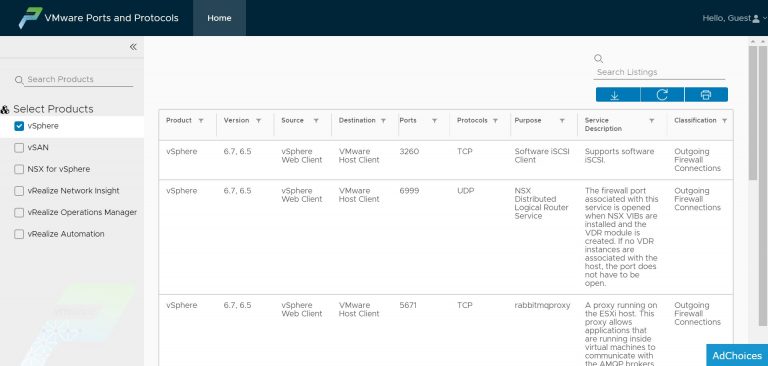
VMware’s products needs to communicate together or communicate with other components of services via network, administrators must know that components will communicate via which ports and protocols. VMware has provided a tool to find port and protocol of popular VMware’s products which called ” VMware Ports and Protocols”. Currently, you can find ports and protocols which the below products used: vSphere vSAN NSX for vSphere vRealize Network Insight vRealize Operations Manager vRealize Automation Note: The recent versions of the mentioned products and not out of support products. External Links VMware Ports and Protocols

HPE Power 3

HPE G10 Servers: Best and Optimized Setting for VMware vSphere

Optimizing HPE server configuration is always one of biggest challenges for virtual environments administrators. The administrators always trying to provide best performance by changing configurations on hypervisor, virtual machines or other components or virtual infrastructure. There are best practices which published by server vendors to achieve best performance on their server platform. Server hardware is one most important component in every environment, server provides main power and resource: Computing Resources. Processor and memory and other server’s component made to work almost like as human brain. Some Important Things! Human brain needs consumes about 20 percent of the body’s energy. Consume more energy is equal to more heat in human body. Server components needs energy and cooling, like human body. Energy and cooling needs money. So there is a challenge to keep balance between performance and cost of services in any IT environments. What’s Important About Server Hardware? In fact, processors and cooling system consume most power which provided by power modules. Don’t think about single server, think about hundreds of servers and thousands processors, thousand x 200W! (At least). Best performance has more cost for any environment also needs more maintenance. What’s Best Practices? Best practices are depended to workload...