Category: Reviews

Virtualization Software Reviews, Backup & Replication Software Reviews, Monitoring Software Reviews.

VMware Data Services Manager Architecture 0

Unlocking Database Management with VMware Data Services Manager: Features, Benefits, and Comparisons
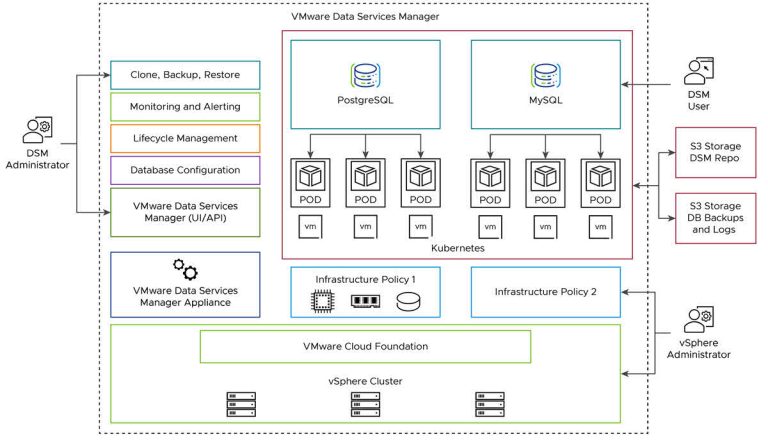
Data is the foundation of any organization in the digitally first world of today. Effective database management is essential, but it presents difficulties with scalability, maintenance, security, and cross-environment compatibility. A potent tool for streamlining and simplifying database administration in contemporary infrastructures is VMware Data Services Manager (DSM).

In-depth discussions of VMware Data Services Manager’s features supported solutions, deployment strategies, advantages, and use cases are provided in this blog. To help you make wise decisions regarding database operations in your company, we’ll also contrast it with conventional database management techniques and other options.

0

Understanding vTopology in vSphere 8: A Deep Dive into NUMA and vNUMA Management

With its state-of-the-art innovations, VMware vSphere continues to lead the virtualization ecosystem, and vSphere 8 brings major improvements to vTopology, a framework designed to optimize NUMA (Non-Uniform Memory Access) and vNUMA (Virtual Non-Uniform Memory Access) configurations for modern workloads. Effectively managing NUMA and vNUMA is essential in virtualized environments to maximize performance for CPU- and memory-intensive applications. In this extensive blog post, we’ll examine the development of vTopology in vSphere 8, compare it to previous iterations, and offer practical insights into optimizing NUMA and vNUMA configurations. Let’s also highlight important features, best practices, and real-world scenarios to help you better understand.

Vector Database 0

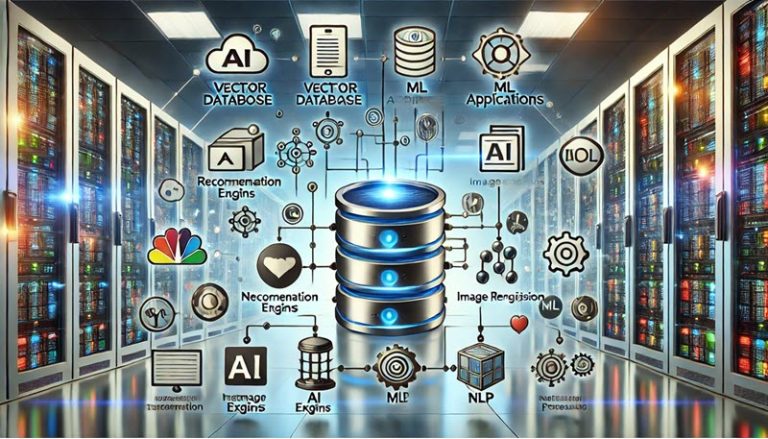
Vector Databases: Use Cases and Best Practices in VMware vSphere Environments

Vector databases can provide special advantages to businesses that have already made investments in virtualized environments such as VMware vSphere. The centralized management, scalability, and flexibility of VMware vSphere make it the perfect platform for vector database hosting. We’ll go into great detail about vector databases in this post, look at some of their most important applications, and offer best practices for maximizing vector database performance in VMware vSphere settings.

2

Oracle Linux Automation Manager: Supercharge Your IT with Intelligent Automation

Spreading infrastructure and constantly shifting needs in today’s IT environment may easily convert system administration into a wild beast. Manual setups become laborious and prone to errors, which impedes creativity and agility. This is where automation becomes useful, providing your IT environment with a potent tool to tame the beast and restore order.

Let me introduce you to Oracle Linux Automation Manager (OLAM), a powerful tool that makes infrastructure provisioning, configuration management, and deployment procedures much easier. Based on the open-source giants Ansible and AWX, OLAM provides a centralized web interface for effective management and visibility into your IT environment.

0

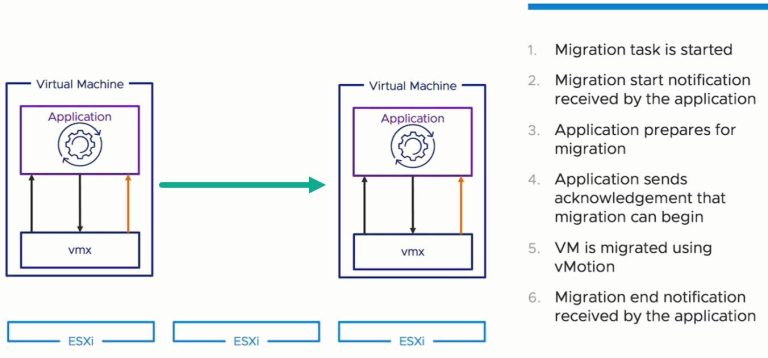
A Deep Dive into VMware vSphere vMotion Application Notification: Keeping Applications in the Loop

Ensuring application availability and performance during infrastructure maintenance is essential in the ever changing virtualization landscape. VMware’s flagship product, vMotion, allows virtual machines (VMs) to be moved between physical hosts without interruption. How about the programmes that are executing in such virtual machines? Can they be told that the relocation is coming and given enough time to be ready?

Now for vMotion Application Notification, a revolutionary feature that debuted with vSphere 8. By giving apps the ability to actively participate in the vMotion process, this feature improves resiliency and reduces migration interruptions. Let’s investigate the advantages, settings, and best practices of this cutting-edge technology in more detail.