Category Virtualization

Operating System Level Virtualization (Part 2) – Implementations Comparison
Linux Container

These days, everyone knows what's Cloud Computing and cloud based services are using for speedup deployment of organizations services. Operating System Level Virtualization or Containers helping system architectures and administrators to achieve the goals. There are many implementations for containers that today, those methods are compatible with different hardware architectures and operating system.

You may know that Unix has OS Level Virtualization from past years and this technology is very older than other virtualization such as Full Virtualization or Paravirtulization.

Full Virtualization (VMware ESXi, Hyper-V) and Paravirtualization (Xen, UML) provides different guest OS but there is no way to use different guest OS when you are using containers. Of curse, some solutions are under development.
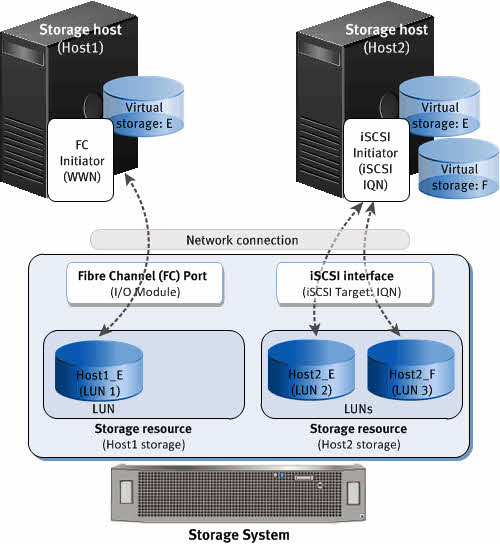
Guest Connected vs RAW Device Mapping (RDM)

iSCSI vs Fiber Channel

RAW Device Mapping (RDM) is one of oldest VMware vSphere features which introduced to resolving some limitation on virtualized environments such as virtual disks size limitation and deploying services top of fail-over clustering services.

You can use a raw device mapping (RDM) to store virtual machine data directly on a SAN LUN, instead of storing it in a virtual disk file. You can add an RDM disk to an existing virtual machine, or you can add the disk when you customize the virtual machine hardware during the virtual machine creation process.

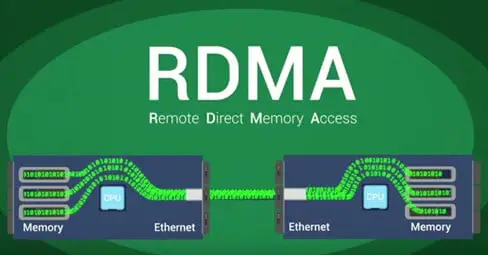
[Review]: What’s Remote Direct Memory Access(RDMA)?

Remote Direct Memory Access

Remote Direct Memory Access (RDMA) provides direct memory access from the memory of one host (storage or compute) to the memory of another host without involving the remote Operating System and CPU, boosting network and host performance with lower latency, lower CPU load and higher bandwidth. In contrast, TCP/IP communications typically require copy operations, which add latency and consume significant CPU and memory resources.

[Review]: Oracle Secure Global Desktop

Oracle Secure Global Desktop

Oracle Secure Global Desktop is a secure remote access solution for any cloud-hosted enterprise application and hosted desktops running on Microsoft Windows, Linux, Oracle Solaris and mainframe servers. Oracle Secure Global Desktop works with a wide range of popular client devices, including Windows PCs, Macs, Linux PCs, Chromebook and tablets such as the Apple iPad and Android-based devices.