

Broadcom shipped VMware Cloud Foundation 9.1 in May 2026. The marketing says “AI-ready private cloud.” The release notes tell a different story — one about operational maturity finally catching up to the platform’s ambition.
I’ve been running VMware Cloud Foundation since the 3.x days. This is the first release where the day-2 operations story feels complete. Not perfect. Complete.
VMware Cloud Foundation 9.1 Licensing: Core-Based, Subscription-Only, No Way Back
Perpetual licenses are gone. Broadcom killed them in 2024. If you’re still on 25-character keys, you’re already non-compliant.
VCF 9.1 connected mode eliminates manual license file handling. The Business Services Console (https://vcf.broadcom.com/vcf/clm) pushes license files to VCF Operations every 24 hours. Fleet-scale enforcement policies apply centrally — define password reuse restrictions once, enforce everywhere.
Two Tiers, Same Core Metric
| What You Get | VCF | VVF (vSphere Foundation) |
|---|---|---|
| Target | Full SDDC (HCI + NSX + Aria + Tanzu) | Compute + basic VKS + limited vSAN |
| License Unit | Physical CPU cores (min 16/core/CPU) | Physical CPU cores (min 16/core/CPU) |
| Storage | vSAN TiBs (separate SKU) | 1 TiB vSAN per core (capped) |
| Management | VCF Operations (SDDC Manager) | VCF Operations (standalone) |
| Private AI | Full PAIF w/ NVIDIA | Not supported |
| Edge/ROBO | Stretched clusters, stretched vSAN | Limited ROBO |
Core counting hasn’t changed:
Total Licensable Cores = Σ (Physical Cores per CPU × CPU Sockets per Host)
Minimum: 16 cores per CPU socket (even if CPU has fewer)
Subscription Terms: 1, 3, or 5 years
What’s new in 9.1: vSAN TiB entitlement tracking per cluster in VCF Operations. Finally, chargeback works without spreadsheets.
vCenter Patching: Finally Under 5 Minutes
Traditional vCenter patch = full RPM refresh = 30-60 minute maintenance window. vCenter Quick Patch changes this.
POST /api/vcenter/lcm/patches/quick-patch
{
"patch_spec": {
"patch_url": "https://vapp-updates.vmware.com/.../quick-patch-9.1.0.1.iso",
"accept_eula": true
}
}
Quick Patch updates only modified binaries. VAMI detects compatibility via metadata flag. Compatible patches apply in under 5 minutes — sometimes zero control-plane downtime.
Envoy proxy now fronts all management APIs. During maintenance:
HTTP/1.1 503 Service Unavailable
Retry-After: 300
X-VC-Maintenance: true
X-VC-Maintenance-ETA: 2026-05-15T14:30:00Z
X-VC-Maintenance-Type: quick-patch
vSphere Client, SDKs, Aria Operations — they all respect Retry-After. Automation pauses instead of failing. This is a contractual API guarantee.
Zero-Touch Provisioning: TFTP Is Dead
Legacy Auto Deploy needed TFTP + DHCP options 66/67. ZTP 9.1 removes TFTP entirely.
UEFI Firmware → HTTPS Boot URL (vCenter) → iPXE → ESXi Installer → Config Profile → Compliant Host
Boot URL: https://vcenter.fqdn:443/ztp/boot/{cluster-moid}/{host-moid}
Configuration Profile (YAML):
host:
  network:
    vswitch: vds-mgmt
    mtu: 9000
    ntp_servers: ["ntp1.corp.local", "ntp2.corp.local"]
  security:
    lockdown_mode: normal
    tpm: enabled
    uefi_secure_boot: true
  storage:
    vsan:
      enabled: true
      deduplication: true
      compression: zstd
Compute: Topology-Aware Scheduler (TAS) Finally Exists
Modern servers: 2-8 NUMA nodes, 64-256 cores, 4-8 GPUs per socket. Default DRS ignores all of it.
TAS consumes:
- NUMA distance matrix (`vsish` → `/sched/numa/hwLatency`)
- GPU/NVLink topology (`nvidia-smi –topo`)
- CXL memory tier mapping
- Accelerator device inventory (vSphere Device API)
VM Class with GPU Reservation
apiVersion: vmoperator.vmware.com/v1alpha1
kind: VirtualMachineClass
metadata:
  name: ai-inference-a100-40gb
spec:
  hardware:
    cpu: 32
    memory: 256Gi
    devices:
      gpus:
        - vendor: nvidia
          model: A100-40GB
          count: 2
          profile: vgpu-40c
  policies:
    resources:
      requests:
        nvidia.com/gpu: "2"
      limits:
        nvidia.com/gpu: "2"
    affinity:
      numa:
        preferred: true
        topology: "single-node"
      gpu:
        nvlink: required
Scheduler decision flow:
- Filter hosts with required GPU count + vGPU profile
- Score by NUMA distance (CPU ↔ GPU ↔ CXL memory)
- Prefer single-NUMA-node placement for latency-sensitive inference
- Reserve GPU BAR space: `pciPassthru0.msiEnabled = “TRUE”`
NUMA/vNUMA: What Changed
| Feature | vSphere 8 | vSphere 9.1 |
|---|---|---|
| vNUMA auto-sizing | Static at boot | Dynamic (hot-add aware) |
| NUMA client max vCPUs | 16 per NUMA node | 32 per NUMA node |
| NVMe tier awareness | No | Yes (memory tiering) |
| GPU NUMA affinity | Manual (`numa.nodeAffinity`) | Automatic via TAS |
| Inter-NUMA latency exposure | `esxtop` only | vCenter UI + API |
This builds on what I covered in vTopology in vSphere: NUMA and vNUMA Management (https://www.teimouri.net/vtopology-in-vsphere-numa-vnuma-best-practices/) — TAS operationalizes those concepts.
Storage: vSAN 9.1 Global Dedupe GA, ZSTD, Immutable Snaps
Global Deduplication: GA at Last
Capacity Reduction: Up to 8× (typical 3-5× mixed workloads)
Performance Impact: < 2% latency overhead (vs 5-8% in 8.0)
Encryption Support: Yes — dedupe + encryption at rest now compatible
Stretched Clusters: Not yet supported (EU constraint)
SHA-256 fingerprint per 4KB block. Global namespace across disk groups. Fingerprint index in DRAM (~1GB per 1TB logical).
esxcli vsan policy setdefault -c vdisk -p "("globalDedupe" "true")"
esxcli vsan policy setdefault -c vdisk -p "compression" "zstd"
Compression: ZSTD Is the New Default
| Algoritm | Ratio | CPU Overhead | Use Case |
|---|---|---|---|
| LZ4 (legacy) | 1.5-2× | Low | High-IOPS, low-latency |
| ZSTD (default) | 2.5-4× | Moderate | General purpose |
| ZSTD-HC | 3-5× | High | Archive/cold data |
ZSTD delivers 40% better ratio than LZ4 at comparable throughput on Ice Lake+/Milan+.
ZSTD delivers 40% better ratio than LZ4 at comparable throughput on Ice Lake+/Milan+.
VCF 9.1 rebrands vSAN Data Protection → vSAN Protection and Recovery — structural rewrite.
Snapshot Creation → Immutability Lock (configurable retention) → Replication (1-min RPO) → Recovery Site
                                    │
                                    └─ Cannot delete/modify until lock expires
                                       Even root@vcf-admin cannot bypass
SRM Ransomware Recovery Workflow:
- 1. Detection: vSAN Health Check “Snapshots Immutability Check” alerts on lock violations
- 2. Isolation: SRM Protection Group → “Ransomware Recovery” mode
- 3. Analysis: Immutable snapshot timeline → last clean point
- 4. Recovery: Orchestrated failover with validated snapshots
- 5. Validation: Automated boot verification + app health checks
- 6. Failback: Reverse replication after forensic clearance
Replication frequency: 1 minute (was 15 min in 8.0). Hundreds of recovery points.
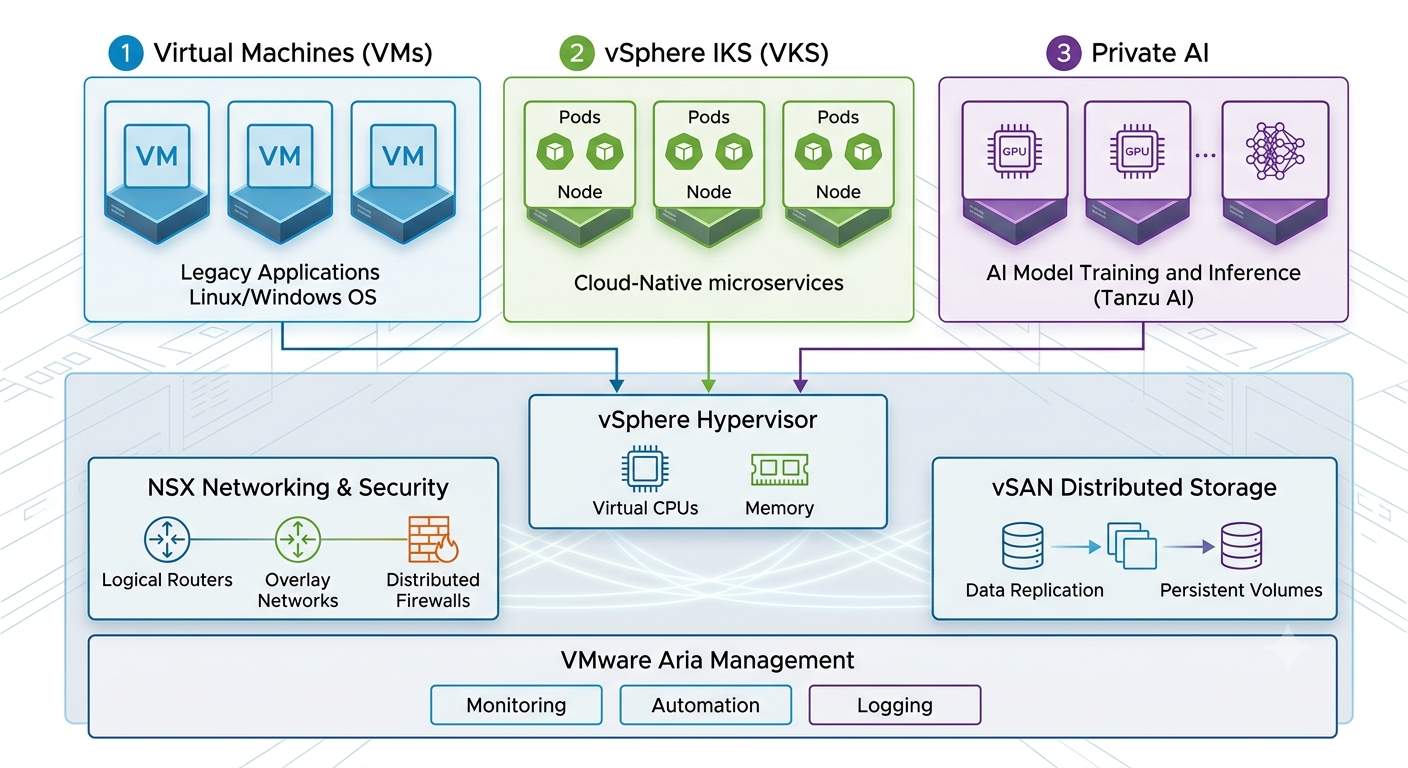
VMware Cloud Foundation 9.1 – Private AI: Unified Control Plane, Not a Science Project
┌─────────────────────────────────────────────────────────────────────┐
│                    VCF 9.1 Private Cloud                            │
│  ┌──────────────┐  ┌──────────────┐  ┌───────────────────────────┐  │
│  │ VM Workloads │  │ K8s (VKS)    │  │ AI Inference (PAIF/NVIDIA)│  │
│  │ • Traditional│  │ • Tanzu      │  │ • NVIDIA NIM Microservices│  │
│  │ • Databases  │  │ • Upstream   │  │ • vGPU / GPU Passthrough  │  │
│  │ • Apps       │  │ • Helm/OCI   │  │ • pgvector (DSM)          │  │
│  └──────────────┘  └──────────────┘  └───────────────────────────┘  │
│         │                │                        │                 │
│         └────────────────┼────────────────────────┘                 │
│                          ▼                                          │
│  ┌───────────────────────────────────────────────────────────────┐  │
│  │  Shared Substrate: vSphere 9.1 + vSAN 9.1 + NSX 4.2 + Aria    │  │
│  └───────────────────────────────────────────────────────────────┘  │
└─────────────────────────────────────────────────────────────────────┘
Prerequisites (No Shortcuts)
✓ VCF 9.1 + Private AI Foundation license (Broadcom)
✓ NVIDIA AI Enterprise license (NVIDIA) — per GPU
✓ GPU hosts: H100/A100/L40S/L4, AMD MI300X, Intel Gaudi3
✓ vSAN ESA (recommended) or OSA with NVMe tier
✓ NSX for micro-segmentation (AI tenant isolation)
✓ VKS enabled for containerized AI workloads
Three Inference Patterns
Pattern 1: vGPU Multi-Tenant
vmClass: ai-inference-a100-20gb
GPU Profile: vgpu-20c
Workload: NVIDIA NIM (Llama-3-8B, Mistral-7B)
Density: 4 vGPUs per A100 40GB
Isolation: NVIDIA MIG + vSphere VM encryption
Pattern 2: GPU Passthrough
vmClass: ai-inference-h100-passthrough
GPU: NVIDIA H100 (passthrough)
Workload: TensorRT-LLM, vLLM, Triton Inference Server
Features: NVLink/NVSwitch topology awareness, TAS placement
Pattern 3: VKS + GPU Operator
apiVersion: vmoperator.vmware.com/v1alpha1
kind: VKSCluster
spec:
gpuOperator:
enabled: true
driverVersion: "550.90"
migStrategy: "single"
nodePools:
- name: gpu-pool
vmClass: ai-inference-a100-40gb
replicas: 3
DSM: pgvector for RAG
DSM 9.1 provisions PostgreSQL + pgvector as managed service:
dsm postgres create \
--name rag-vector-db \
--version 16 \
--extension pgvector \
--size 500Gi \
--replicas 3 \
--storage-class vsan-esa-dedup
No separate PostgreSQL management. Covered this in VMware Data Services Manager (DSM).
Zero-Downtime Operations: Live Patch + QAT Offload
ESX Live Patch: 80% of Patches, No Reboot
Traditional Cycle (90% of patches):
- Maintenance Mode (evacuate VMs) → 15-60 min
- Apply VIB → 5-10 min
- Reboot → 10-20 min
- Exit Maintenance Mode → 5-15 min
TOTAL: 35-105 min per host
Live Patch Cycle (80% of patches):
- Apply Live Patch VIB → 2-5 min
- Validate → 1-2 min
TOTAL: 3-7 min per host
VM Impact: ZERO
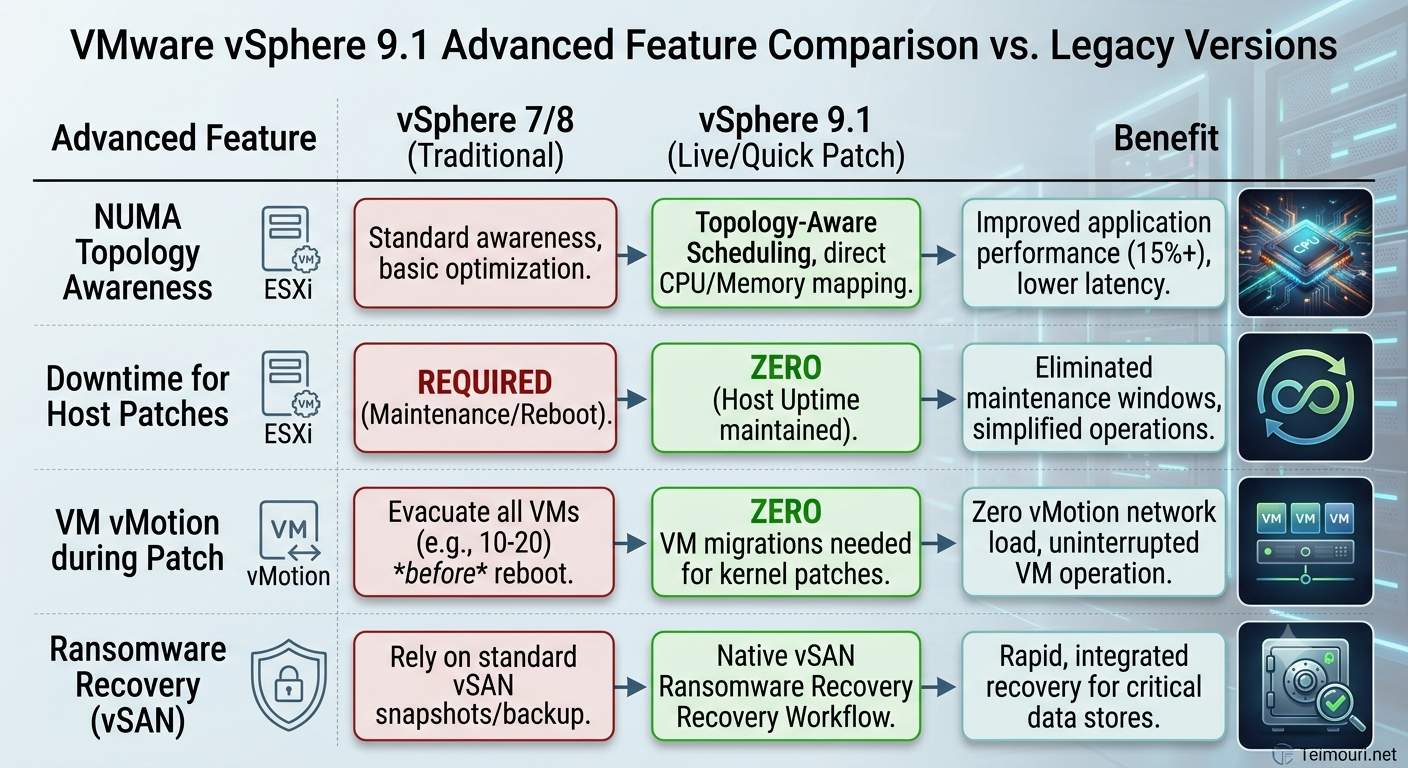
Eligible: Security patches, bug fixes in vmkernel, chardev, net, storage modules. Not eligible: Microcode, hardware drivers, boot loader.
9.1 enhancement: Live Patch now supports TPM-enabled hosts (blocked in 8.0/9.0).
DRS Optimized Evacuation: For the 20% requiring reboot, DRS checks compute capacity headroom before evacuation — only migrates if destination has capacity without contention.
vMotion Encryption Offload: Intel QAT
Encrypted vMotion (since 6.5) burned 15-30% CPU. QAT offload moves AES-GCM to hardware — 70% CPU reduction, 3× throughput.
Requirements: Intel Ice Lake+ with QAT enabled in BIOS. NSX not required.
esxcli system settings encryption set --vmotion-encryption-offload true
lspci -d 8086:4940  # Verify QAT device
Memory Tiering: NVMe/CXL as DRAM Extension
Hot Pages (Active Working Set)
┌─────────────────────┐
│ DRAM (DDR5)         │ ← Sub-μs latency
│ 256-512 GB/host     │
└──────────┬──────────┘
           │ Page Demotion (idle > threshold)
           ▼
Warm Pages (Infrequent Access)
┌─────────────────────┐
│ CXL-Attached Mem    │ ← 200-500ns latency
│ 1-2 TB/host         │ (Intel CXL 2.0, AMD CXL 1.1)
└──────────┬──────────┘
           │ Page Demotion (cold)
           ▼
Cold Pages (Capacity Tier)
┌─────────────────────┐
│ NVMe (PM1743)       │ ← 10-20μs latency
│ 8-16 TB/host        │ (vSAN ESA)
└─────────────────────┘
VMware Cloud Foundation 9.1: Changes That Matter
| Feature | VMware Cloud Foundation 9.0 | VMware Cloud Foundation 9.1 |
|---|---|---|
| Reboot to enable | Required | Not required (dynamic) |
| CXL 2.0 Support | No | Yes (Granite Rapids, Turin) |
| Tiering Policy API | No | Yes (per-VM class) |
| vMotion Compatibility | Cold migrate only | Live vMotion supported |
| Monitoring | esxtop only | vCenter UI + Aria Operations |
TCO impact: Up to 40% fewer servers for same VM density. DRAM is the expensive part — tiering shifts capacity to cheaper NVMe/CXL.
TLS 1.3 Minimum
Now, vSphere 9.1 enforces TLS 1.3 for all management traffic. Thus, TLS 1.2 disabled by default.
openssl s_client -connect vcenter.fqdn:443 -tls1_3Moreover, FIPS 140‑3 Level 1 out of the box (vCenter, ESXi, NSX, Aria):
- vCenter Server Appliance
- ESXi hosts
- NSX Manager/Edge
- Aria Operations
Certificate Lifecycle Automation
Specifically, VMCA manages vCenter + all ESXi host certificates.
Certificate Lifecycle (9.1):
- VMCA issues certs (2-year validity)
- In detail, 30 days before expiry → Autorenewal triggered
- New cert pushed to all managed entities
- Services reload gracefully (no restart)
- Audit log entry in VCF Operations
Therefore, Custom CA: Import enterprise root → VMCA becomes subordinate → all certs chain to enterprise PKI.
VMware Cloud Foundation 9.1 Upgrade Path: Know Where You Stand
First, supported upgrade matrix (VCF 5.2.x → 9.1 direct, 5.1.x → 5.2 first, 4.x → rebuild, VVF 9.0 → 9.1 direct).
Next, pre‑upgrade checklist (VCF Ops 9.0.2+, ESXi 8.0 U3e+, vSAN ESA 8.0 U3+, NSX 4.1.2+, Aria 8.14+, backups, active subscription, HCL‑verified hardware).
| From version | To VCF 9.1 | Path |
|---|---|---|
| VCF 5.2.x | ✅ Direct | SDDC Manager → 9.1 |
| VCF 5.1.x | ❌ | Upgrade to 5.2 first |
| VCF 4.x | ❌ | Full rebuild required |
| VVF 9.0 | ✅ Direct | VCF Operations → 9.1 |
VMware Cloud Foundation 9.1 Pre-Upgrade Checklist
✓ VCF Operations at 9.0.2+ (Holodeck 9.1 for lab validation)
✓ All hosts at ESXi 8.0 U3e minimum
✓ vSAN ESA 8.0 U3+ (if using ESA)
✓ NSX 4.1.2+ (4.2 recommended)
✓ Aria Suite 8.14+
✓ Backup: SDDC Manager, vCenter, NSX Manager
✓ License: VCF 9.1 subscription active in Business Services Console
✓ Hardware: HCL verified for 9.1 (Intel 4th/5th Gen, AMD Genoa/Bergamo/Turin)
Day-2 Operations: The Delta
Finally, day‑2 delta table (Live Patch, Quick Patch, ZTP, core‑based licensing, auto‑cert renewal, Private AI Foundation, immutable snapshots + SRM).
| Operation | Legacy (Pre-9.1) | VCF 9.1 |
|---|---|---|
| Host Patch | Manual/Update Manager | Live Patch (80%) + DRS Optimized |
| vCenter Patch | 30-60 min downtime | Quick Patch (<5 min, often zero) |
| Host Provision | Auto Deploy + TFTP | ZTP UEFI HTTP/S + Config Profiles |
| License Mgmt | 25-char keys, per-component | Core-based, centralized, auto-sync |
| Cert Mgmt | Manual/CSR | Auto-renewal, enterprise CA support |
| AI Workload | DIY on vSphere | Private AI Foundation (managed) |
| Ransomware Recovery | SRM + manual | Integrated immutable snapshots + SRM |
For Reference, External References
VCF 9.1 Upgrade Guide — Broadcom TechDocs: Upgrading to VMware Cloud Foundation 9.1
Broadcom Support Portal — Licensing & Entitlements: https://support.broadcom.com/group/ecx/vmware-cloud-foundation
Likewise, Internal Links (teimouri.net)
vTopology in vSphere: NUMA and vNUMA Management: https://www.teimouri.net/vtopology-in-vsphere-numa-vnuma-best-practices/
Static Binding vs Ephemeral Binding in VDS: https://www.teimouri.net/distributed-switch-static-ephemeral-binding/
Deprecated Features from Legacy vSphere Versions: https://www.teimouri.net/whats-removed-from-vmware-vsphere-7/
Bottom Line
In summary, VCF 9.1 isn’t an incremental update. Indeed, it’s the first release where licensing, patching, provisioning, scheduling, storage, security, and AI all operate from a single control plane with fleet-wide automation.
Consequently, for VCF 5.x shops: The 18-month security patch clock is ticking. VCF 8/9 end-of-support dates are fixed. Therefore, upgrade to 9.1 isn’t optional — it’s the only path to continued security updates and Private AI capability.
