Category: Data Center

EMC Unity 3

Dell EMC Unity OE 5.0.2.0.5.009

EMC has released new upgrade file for Unity family (5.0.2.0.5.009) but I couldn’t find Release Notes link till now. Seems, the upgrade file is contains some minor fixes and security fixes as well. (Now I know that some issues were major!) The file size is as big as previous releases, but as I know, the below security issues have been fixed on this release. (Thanks to “derWolle“, I don’t know him but he has read the post and sent me the link of release notes: https://support.emc.com/docu97010_Dell-EMC-Unity-Family-5.0.2.0.5.009-Release-Notes.pdf?language=en_US Seems, there is new feature and important fixes: Initially Configuring your Unity syste: When initially configuring your system, you will need to reset the default password whether you are using the Unisphere UI, REST API, SMI-S, Service Commands, or CLI. Support for new Power Supply Unit (PSU): Unity Operating Environment 5.0.2.0.5.009 contains updated firmware to support the new PSU part number 071-000-208-XX. The below security issues have been addressed and 21 technical issue which opened from previous releases have been fixed: bzip2 CVE-2016-3189 CVE-2019-12900                curl CVE-2019-5482 glib2 CVE-2019-13012 libgcrypt CVE-2019-13627 Mozilla-nss, libfreebl3, libsoftokn3   CVE-2019-9811 CVE-2019-11709 CVE-2019-11711 CVE-2019-11712 CVE-2019-11713 CVE-2019-11715 CVE-2019-11717 CVE-2019-11719 CVE-2019-11729 CVE-2019-11730 perl CVE-2018-18311 polkit CVE-2019-6133 python CVE-2018-20852 CVE-2019-9636 CVE-2019-10160  Further Reading...
0

HPE FlexFabric 650FLB Adapter May Cause PSOD on ESXi 6.x

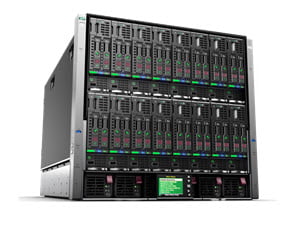
Seems, there is an issue on HPE Blade Servers when a specific adapter is installed on server. If there is any server of the below models in your virtual environment that you should consider to this post: HPE ProLiant BL460c Gen10 Server Blade HPE ProLiant BL460c Gen9 Server Blade HPE ProLiant BL660c Gen9 Server HPE servers running VMware ESXi 6.0, VMware ESXi 6.5 or VMware ESXi 6.7 and configured with an HPE FlexFabric 20Gb 2-port 650FLB Adapter with driver version 12.0.1211.0 (or prior), a “wake NOT set” message is logged in the Vmkernel logs. Then after 20 to 30 days of server run time, a Purple Screen of Death (PSOD) may display a brcmfcoe: lpfc_sli_issue_iocb_wait:10828 message. The following errors are displayed in the VMkernel logs after approximately 50 to 70 days of server run time: 2019-07-20T00:46:10.267Z cpu33:69346)WARNING: brcmfcoe: lpfc_sli_issue_iocb_wait:10828: 0:0330 IOCB wake NOT set, Data x24 x0 2019-07-20T01:10:14.266Z cpu33:69346)WARNING: brcmfcoe: lpfc_sli_issue_iocb_wait:10828: 0:0330 IOCB wake NOT set, Data x24 x0 2019-07-20T02:16:25.801Z cpu33:69346)WARNING: brcmfcoe: lpfc_sli_issue_iocb_wait:10828: 0:0330 IOCB wake NOT set, Data x24 x0 2019-07-20T02:22:26.957Z cpu33:69346)WARNING: brcmfcoe: lpfc_sli_issue_iocb_wait:10828: 0:0330 IOCB wake NOT set, Data x24 x0 2019-07-20T03:26:39.057Z cpu11:69346)WARNING: brcmfcoe: lpfc_sli_issue_iocb_wait:10828: 0:0330 IOCB wake NOT set, Data x24 x0 2019-07-20T04:06:46.158Z cpu11:69346)WARNING: brcmfcoe: lpfc_sli_issue_iocb_wait:10828: 0:0330...

kubewise 1

Kubewise, Multi-Platform Desktop Client for Kubernetes

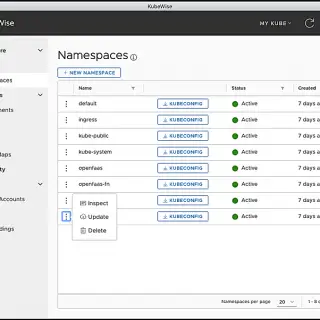
Kubewise is a simple multi-platform desktop client for Kubernetes. In the same way the kubectl command requires only a valid kubeconfig file to run commands against a Kubernetes cluster, Kubewise requires you just to configure one or more valid kubeconfig files to interact with the corresponding Kubernetes clusters. Main features: Support for multiple kubeconfig files. UI-driven interaction with the most frequently used Kubernetes entities. One-click terminal with the proper KUBECONFIG env variable set. Generation of custom kubeconfig files for a given namespace. Highlight sustaniability and security-related data. Requirements Kubewise is a desktop application built with HTML, JavaScript, CSS and Node.js, and it runs on Electron, a framework for building cross platform apps using web technologies. So for running it, basically, all you need is: Any modern macOS, Windows or Linux (Debian-based) OS. kubectl v1.14.0+ installed to access Kubernetes v1.14.0+ clusters. External Links Kubewise

0

Linux Deduplication and Compression: The Ultimate Guide to Saving Space

Cost of storage is the biggest piece of IT budget in any company (Of course not EMC, HPE or other like them 😀 ) and the storage spaces is eating by databases, other data files and backup files as well. Lot of those data file not be used once generated!. I have serious issue with these types of data and especially log files that one of dark data types. I can’t stop generating those data and the related teams are always crying about free space on their servers. They want just Linux servers (Seems, they don’t know Windows has NFS services as well), because they are using shared space on application servers to storing log files and others via NFS. I have offered other solutions such as using Windows as NFS server and use deduplication on Windows Servers, this feature is really good. I have used Windows deduplication on our backup proxy servers and result was incredible. Anyway, they want to Linux server (Not even other Unix-Like!), so I started to googling these: Don’t panic, most Linux’s modern file systems have no native deduplication and transparent compression and must be enabled with third-party software. Let’s see what is deduplication and...

EMC Unity 0

Some Lower-End Unity Models Could Experience Single or Dual SP Reboots When Running Unity OE 5.0

This is warning and workaround about EMC Unity OE 5.0 on some Unity systems with fewer memory capacity. Let’s see what happened? The lower-end Unity systems, in particular the Unity 300 and 300F, contain less physical memory than the higher-end Unity models.  The lower available system memory makes them more vulnerable to experience an SP reboot brought about by the “mergelogs” component of NGTRiiAGE which is run by uDoctor on SRS enabled arrays.   It is also run periodically on non-SRS enabled arrays. If your Unity system is SRS enabled, “mergelogs” will run at least once per day. Changes intro-duced in Unity OE 5.0.x make the “mergelogs” function more memory intensive, which causes the process to run closer to the limits of the available memory budget.  If the available memory is exceeded, the SP may reboot. A hotfix is available for this issue if you are running Unity OE 5.0.0.0.5.116.  To acquire this hot-fix, please contact Dell EMC Technical Support or your authorized service vendor and reference KB article 536786.  This knowledge base article also stipulates a work-around available to customers who have service credentials. You can disable the daily triage service within uDoctor by connecting to your system via SSH...