Category: Data Center

1

Parallel NFS (pNFS) – Part 1 (Introduction)

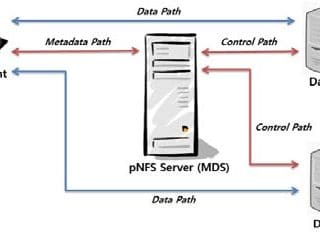
Parallel NFS (pNFS) is a part of the NFS v4.1 standard that allows compute clients to access storage devices directly and in parallel. The pNFS architecture eliminates the scalability and performance issues associated with NFS servers deployed today. This is achieved by the separation of data and metadata, and moving the metadata server out of the data path.

VMware OS Optimization Tool 0

Windows OS Optimization Tool for VMware Horizon

Windows OS Optimization Tools was a VMware’s Fling and this free tool has been productized now. Windows “OS Optimization Tool For VMware Horizon” will be official Horizon’s components from VMware Horizon 2111. What’s Windows OS Optimization Tool for VMware Horizon? The Windows OS Optimization Tool for Horizon makes it easy to apply configuration settings to desktops and servers. It includes settings to optimize the following Windows operating systems for both desktops and servers that reside in the data center and in the cloud: Windows 11 Windows 10 Windows Server 2022 Windows Server 2019 The Windows OS Optimization Tool for Horizon optimizes virtual desktops and RDSH servers for Horizon, and Horizon Cloud. Notes: The Windows OS Optimization Tool for Horizon is not compatible with Windows 7, 8.1, Server 2012, Server 2012 R2, and Server 2016. An older version of the OS Optimization Tool (b1130) is available to download from the VMware Flings site to use on these OS versions. The optimization information in this guide does not pertain to Windows XP or Windows 7, which Microsoft no longer supports. For more information, see the Windows XP Deployment Guide. The Windows OS Optimization Tool for Horizon helps with three key steps in this process: Optimize...
1

EMC Unity Host Group, Finally Came!

EMC Unity array was released in 2016 to replace VNX and VNXe family with another mid-range array solution. EMC Unity came with lots of new features and enhancements compare to older families but there was an absent feature that VNX offering. Host access method was changed and each LUN should have been present to each host separately. More than 4 years from GA release, we were waiting for changing host access method because presenting LUN to each host was horrible in large scale environment with many hosts and LUNs. Biggest Change In EMC Unity OE 5.1.0.0.5.394 Previous versions have “Consistency Group” with some limits to present a LUN or more than one LUN to group of hosts. EMC Unity OE 5.1.0.0.5.394 including new feature that the new feature is like VNX Storage Group. The new feature called “Host Group“. You could assign or present multiple LUN to multiple hosts in OE version 5.0 and later but Host Group is the feature that we want. In Dell EMC Unity OE version 5.1 users can logically group hosts and block resources within a host group. Host groups can be created and managed from the Host Groups tab and help to streamline host/resource...