

No network Adapter issue actually will be happened during installation, if the server has no adapter or the adapter driver is not loaded or the image is not contains of any compatible adapter driver, ESXi installer does stop installation and prompt:
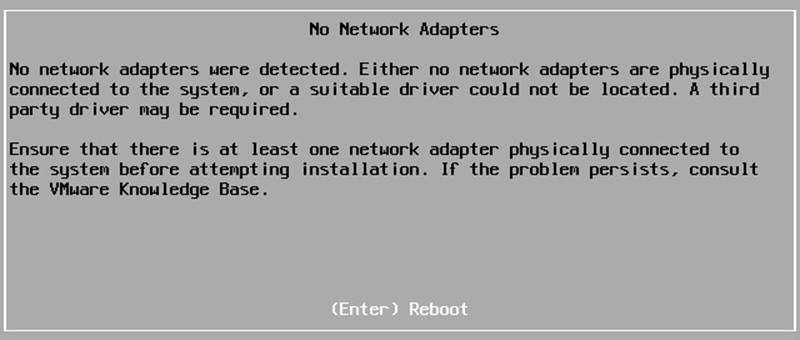
List of Affected Network Adapters
It might be happened even after installation cause of upgrade firmware to an incompatible version. Now, if you are using HPE ProLiant servers and the servers are configured with the below hardware:
- HP ConvergedSystem 900 FlexFabric 20Gb 2-port 630FLB Adapter
- HPE StoreFabric CN1100R 10GBASE-T Dual Port Converged Adapter
- HPE Ethernet 10Gb 2-port 530FLR-SFP+ Adapter
- HPE Flex-10 10Gb 2-port 530FLB Adapter
- HP Flex-10 10Gb 2-port 530M Adapter
- HPE Ethernet 10Gb 2-port 530SFP+ Adapter
- HPE Ethernet 10Gb 2-port 530T Adapter
- HPE FlexFabric 10Gb 2-port 533FLR-T Adapter
- HP FlexFabric 10Gb 2-port 534FLB Adapter
- HPE FlexFabric 10Gb 2-port 534FLR-SFP+ Adapter
- HPE FlexFabric 10Gb 2-port 534M Adapter
- HPE StoreFabric CN1100R Dual Port Converged Adapter
- HPE FlexFabric 20Gb 2-port 630FLB Adapter
- HPE FlexFabric 20Gb 2-port 630M Adapter
- HPE FlexFabric 10Gb 2-port 536FLB Adapter
Your server is affected by an incompatibility issue between adapter firmware and adapter driver.
The issue occurs AFTER upgrading the driver to version 2.713.30 contained in the Service Pack for ProLiant (SPP) 2017.07.1 and the July HPE Custom Images.
The below versions are affected by the issue:
- VMware vSphere 5.5.
- VMware vSpehere 6.0.
- VMware vSphere 6.5.
Solution
The issue might be happened for any server from any vendor but if you have HPE servers, upgrade HPE BNX2X VMware drivers with older or newer firmware image.
https://www.hpe.com/global/swpublishing/MTX-ab64eccfe90a485e821b0e9e12
Also, if you have plan to add new server or upgrade current installation, use the below image or newer:
- VMware-ESXi-6.5.0-Update1-6765664-HPE-650.U1.10.1.5.26-Oct2017.iso
- VMware-ESXi-6.5.0-Update1-6765664-HPE-650.U1.9.6.5.1-Nov2017.iso (Pre-Gen9 Custom Image)
- VMware-ESXi-6.5.0-5310538-HPE-650.10.1.5.20-Oct2017.iso
- VMware-ESXi-6.0.0-Update3-6765062-HPE-600.10.1.5.19-Oct2017.iso
- VMware-ESXi-6.0.0-Update3-5050593-HPE-600.9.7.0.17-Feb2017.iso (Pre-Gen9 Custom Image)
Further Reading
MicroVM and Firecracker: Discover Advantages and Disadvantages
HPE OneView Global Dashboard: Best Software for Global Monitoring

This didn’t help me at all
Send me the detail of your server hardware and the ESXi version that you want to install.
I need help with injecting network drives
Check this: https://github.com/VFrontDe-Org/ESXi-Customizer-PS