

🚀 Introduction
Proxmox VE 9 and Proxmox Backup Server 4.0 were both officially released in late July to early August 2025, introducing major platform upgrades and significant new capabilities.
- Proxmox VE 9.0 marks the ninth major release of the virtualization environment.
- Proxmox Backup Server (PBS) 4.0 is the corresponding fourth major version of the backup solution, already released—built on Debian 13 “Trixie” and ZFS 2.3.3.
In this post you’ll learn:
- What’s new in Proxmox VE 9
- What’s new in Proxmox Backup Server 4.0
- Architectural improvements and why they matter
- Real‑world deployment scenarios
- Upgrade advice and best practices
What’s New in Proxmox VE 9
✅ Core OS & Kernel
- Based on Debian 13 “Trixie” with the Linux kernel 6.14 series (the same kernel line PBS 4.0 uses).
- QEMU upgraded to v10, with the expectation that QEMU 11.2 will be the final shipped release. Proxmox VE 9 drops support for virtual machine “machine versions” older than 6.0; that becomes the new baseline.
🔧 Major Virtualization & LXC Updates
- Cgroup2 enforcement is now mandatory, improving resource control and future compatibility.
- LXC 6.x container stack becomes the default, bringing enhanced features and performance.
🧱 Storage Enhancements
- Shared LVM snapshot support — now you can snapshot shared LVM volumes (iSCSI, Fibre‑Channel, NFS) reliably for VM backups.
- Live RAID‑Z expansion with ZFS — add disks to a RAID‑Z pool without downtime (propagated from PBS ZFS enhancements).
🌐 Networking & SDN Improvements
- Enhanced Software‑Defined Networking: better integration, interface pinning support (binding virtual NICs to physical ports), and improved stability.
💡 User Interface Enhancements
- Dark mode is now the default theme, offering better usability in low‑light environments.
- The installer now includes an ESXi migration utility to import VMs directly from VMware hosts.
⚠️ Other notable changes
- GlusterFS support is deprecated/removed — Proxmox now focuses on Ceph, NFS, and ZFS for scalable storage.
- Installer supports seamless migration of existing setups, and various security hardening measures (e.g., updated authentication flows)
What’s New in Proxmox Backup Server 4.0
🧠 Base platform upgrades
- Built on Debian 13 “Trixie” with the Linux kernel 6.14.8‑2 as stable default.
- Includes OpenZFS 2.3.3, offering improved performance and feature support.
☁️ S3-Compatible Object Storage Integration (Tech Preview)
- Supports S3‑compatible object stores (AWS S3, MinIO, Wasabi) natively as a backup datastore.
- Uses a local cache to reduce API calls and improve restore performance.
⚙️ ZFS RAID‑Z Expansion Without Downtime
- ZFS 2.3 now allows adding devices to RAID‑Z pools while running—very useful for capacity scaling without interruption.
🔁 Automatic Sync Job Triggering
- Automatically triggers sync jobs when removable storage is connected — ideal for off‑line archives or portable backups.
🧼 Smarter Garbage Collection & Retention
- GC has been enhanced to bypass protected jobs intelligently, reducing unnecessary workload and freeing space more efficiently.
🛡️ Security & Authentication
- WebAuthn (passkeys) supported for two‑factor authentication. Some early quirks exist but fixes are in progress (especially for users relying solely on passkeys).
- Better handling of network interface renaming — PBS 4.0 transparently supports alternate interface names when upgrading from kernel 6.8 to 6.14.
🔗 Compatibility & Upgrade Path
- PBS 4.0 supports upgrades from PBS 3.4 via apt, and a migration path from PBS 4.0 beta to stable version exists.
- Supported compatibility: PBS 4 works with Proxmox VE 8 or 9 (backups from PVE 8 to PBS 4 fully supported, older more than two major versions apart is “best‑effort”).

Why These Upgrades Matter
🌍 Unified Platform (Debian 13, Kernel 6.14)
Converging both PVE 9 and PBS 4 on Debian 13 and kernel 6.14 simplifies infrastructure, reduces version mismatches, and ensures long‑term stability.
🔄 Top-to‑Bottom Live Scaling
- ZFS RAID‑Z expansion extension across both PVE and PBS means you can grow storage capacity live.
- Shared LVM snapshot and live migration improve high‑availability operations for VM and storage.
☁️ Hybrid & Cloud-Ready Backup
- S3-compatible support brings cloud flexibility into Proxmox backup workflows (public/private cloud), enabling hybrid architecture and off-site archival.
🔒 Security and Stability
- Modern authentication (WebAuthn), enforced cgroup2, updated kernels, and removal of aging storage (GlusterFS) yield a hardened baseline.
✅ Migration & Integration
- Installer now supports ESXi migration. Combined with enhanced backup/restore, it makes Proxmox a practical migration target from VMware environments.
Real‑World Use Cases & Scenarios
Let’s explore typical deployment scenarios to illustrate how these new features make a difference.
🏢 Enterprise with Virtual Desktop Infrastructure (VDI)
Scenario:
Company runs ~200 virtual desktop VMs with GPU‑accelerated applications (NVIDIA vGPU) and requires zero downtime upgrades.
PVE 9 Benefits:
- Use live migration with mediated GPU—move running GPU‑backed VMs across hosts without shutting down (provided hardware compatibility). Setup via
pve-nvidia-vgpu-helpertool (introduced earlier in PVE 8.4, but live migration fully rolled into PVE 9). - Shared LVM snapshots allow consistent backups even in clustered storage.
PBS 4 Advantages:
- Backups stored on a MinIO S3-compatible object store in private cloud. Local caching ensures backup/restore performance doesn’t suffer.
- Snapshots pushed to remote PBS or object store and retained with smart garbage collection policies.
Result: seamless updates, robust backup, and distributed retention in the cloud.
📦 Scale‑out Hyper‑Converged Cluster with ZFS
Scenario:
All‑in‑one hyper‑converged cluster using ZFS-on-Linux, where compute nodes store both VMs and backup data. Capacity must scale over time.
PVE 9 Benefits:
- Nodes use ZFS pools (RAID‑Z).
- Admin can expand RAID‑Z pools live by adding disks.
PBS 4 Benefits:
- PBS server also uses ZFS 2.3.3, and similarly supports RAID‑Z live expansion.
- Removable backup vaults—like external drives—automatically trigger sync jobs when mounted: very convenient for offline archival or transportable snapshots.
☁️ Hybrid-cloud backup for failover and disaster recovery
Scenario:
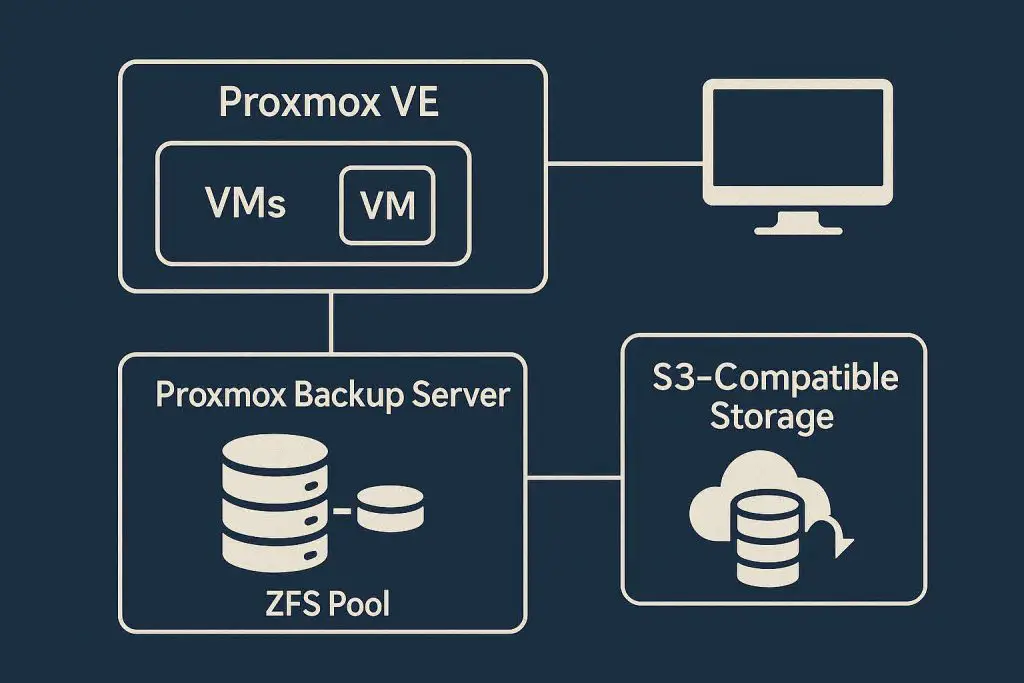
On‑premises Proxmox cluster backs up to PBS 4.0 using public S3 object storage (e.g. Wasabi or AWS S3), with local caching.
PVE/PBS Interaction:
- Proxmox VE 9 backs up into PBS 4 via deduplicated encrypted backup interface.
- PBS 4 stores chunks and metadata in S3-compatible bucket. Local cache ensures frequent operations don’t slow down due to remote latency.
- Sync jobs can replicate backups between PBS instances (e.g. on‑prem to cloud), and retention policies cleanup outdated data efficiently.
This architecture yields geo-resilience, low‑cost archive, and easy restores globally.
🔄 Migrating from VMware ESXi
Scenario:
Organization migrating from VMware ESXi to Proxmox.
Available tools in PVE 9:
- ESXi migration utility built into the installer for easy VM import.
- Post‑migration, backup workloads handled by Proxmox Backup Server using encrypted incremental backups and deduplication.
Flow:
- Install PVE 9, run ESXi migration.
- Configure backup targets to PBS 4.0 or existing PBS 3.4 (still compatible) and schedule backups.
- Use PBS smart garbage collection and retention to limit storage growth, and optionally mirror snapshots to off‑site target via sync jobs or S3.
Upgrade Guidance & Best Practices
✅ Planning Tips
- Always back up critical VMs before major upgrades.
- For PBS upgrade, ensure your PBS 3.4 installation is up‑to‑date. Verify version via
proxmox-backup-manager versions(should be ≥ 3.4.2‑1) before upgrading. - Avoid upgrading over unstable network console; use SSH with tmux or local console.
🔄 Compatibility Considerations
- PBS 4 will work with both PVE 8.4 and PVE 9. Nonetheless, PVE 9 unlocks full feature synergy.
- Cross‑version backup (e.g. PVE 8 node backing up to PBS 4) is supported, though older client versions may have best‑effort compatibility only.
🚧 Breaking Changes & Pitfalls
- Interface renaming: Kernel upgrade may change NIC names. PBS 4 supports alternative names but manual intervention may be required: pin custom names via
proxmox-network-interface-pinningCLI tool. - Passkeys/WebAuthn: If using passkeys as second‑factor, ensure you have fallback (e.g. TOTP or recovery codes), as early fixes are still being rolled out in PBS 4.0.x.
- GlusterFS removal: Any existing GlusterFS-based storage must be migrated to Ceph/NFS/ZFS before upgrading.
🧪 Testing & Rollout Strategy
- Test upgrade path in a staging environment.
- Validate live-migration scenarios for VMs (especially GPU/vGPU).
- If using ZFS RAID‑Z expansion, conduct a disk‑add operation in test cluster to confirm behavior.
- For S3 backup targets, verify performance and restore operations from cached data and object store.
- Plan a rollback strategy or snapshot-based fallback before full rollout.
Feature Comparison Summary
| Component | Key Enhancements in PVE 9 | Key Enhancements in PBS 4.0 |
|---|---|---|
| Kernel & Base OS | Debian 13, Linux 6.14, QEMU v10 → 11.2, cgroup2 | Debian 13, Linux 6.14.8‑2, ZFS 2.3.3 |
| VM/Container Tech | LXC 6.x, vGPU live migration, shared LVM snapshot | — |
| Storage & Scaling | Shared LVM snapshots, live RAID‑Z expansion | RAID‑Z expansion, auto sync on removable media |
| Backup Storage Options | Native backup integration with PBS | S3‑compatible object datastore (tech preview) |
| Networking / SDN | Interface pinning, SDN stacking improvements | Transparent handling of renaming, pinning tool available |
| UI Improvements | Default dark mode, ESXi migration utility | Backup UI enhancements, WebAuthn support |
| Security & Compatibility | Hardened stack, GlusterFS removal | WebAuthn passkey support, smart GC, interface renaming |
Final Thoughts
Proxmox VE 9 and Proxmox Backup Server 4.0 deliver a powerful, modernized virtualization and backup platform—tight integration, improved scalability, strong cloud readiness, and hardened security posture:
- The move to Debian 13 and kernel 6.14 ensures compatibility and longevity.
- Enterprise features like vGPU live migration, live ZFS expansion, S3 object backend and smart sync make operational life easier.
- Improved UI and install/upgrade support lower barriers to adoption and migration.
For administrators managing virtualization at scale, hybrid environments, or migrating from legacy platforms, upgrades to PVE 9 and PBS 4 open up a new level of flexibility and resilience.
Further Reading & Resources
- Proxmox official release announcements and forum posts for both PVE 9.0 and PBS 4.0 Proxmox Support Forum+1Proxmox Support Forum+1.
- Detailed StorageReview coverage on PBS 4.0’s S3 integration and ZFS improvements StorageReview.com.
- VirtualizationHowto video deep dive on combined Proxmox VE 9 Beta and PBS 4 Beta releases (highly recommended for video walkthroughs) YouTube.
- Proxmox Roadmap docs detailing PBS version history, interface pinning, and known issues pbs.proxmox.com
✅ Final Recommendation
If you’re planning a new Proxmox installation or updating existing infrastructure, here’s a phased approach:
- Pilot environment: Install Proxmox VE 9 and PBS 4.0 in a test lab.
- Validate workflows: Test backups, migrations, live storage expansions, and S3 integration.
- Train staff on new UI and tools (WebAuthn, sync job policies, installer migration).
- Migrate production clusters, avoiding GlusterFS and ensuring proper backup prior to upgrade.
- Monitor performance, retention, and UI behavior—especially for WebAuthn and interface naming.
With these guiding points, you’ll be able to fully harness the benefits of Proxmox VE 9 and Proxmox Backup Server 4.0.
Read More
VMware vSphere 9.0 Revealed: Why Staying on Old Versions Could Destroy Performance
VMware vSAN Requirements and Best Practices: A Comprehensive Guide
Silent Data Corruption: Understanding, Prevention, and Recovery
Understanding vTopology in vSphere 8: A Deep Dive into NUMA and vNUMA Management
