Category: Backup & Replication
If you have any version of Veeam Backup & Replication for protecting virtual machines in your virtual environment and using vSphere 4 and later, the below problem might happen to you.
The OVM-BKP must be installed on Oracle VM Manager machine and there is no other option. Oracle VM Backup Utility can take backup from VMs when the VM is located on OCFS2 repositories, VMs running on NFS share will be stopped during backup process.
What’s Veeam Availability Console? Veeam Availability Console is new product that provided by Veeam for Service Providers. Veeam Availability Console is a FREE cloud-enabled, multi-tenant platform that delivers everything a service provider needs to deploy, manage and monitor their customers’ Veeam environments virtual, physical or cloud-based no matter where they reside. There’s no doubt that Veeam Availability Console is a powerful solution for service providers, but equally powerful for the large, distributed enterprise. Veeam Managed Backup Portal will be replaced with Veeam Availability Console. Requirements Veeam Availability Console can be work with existing Veeam Cloud Connect. Here is the requirements: 64-bit – Windows Server 2008 R2 SP1 / Windows 7 SP1 or later Veeam Backup & Replication 9.5 Update 2 or later Key Features Veeam Availability Console offers the below features: Remote monitoring and management: Start and stop Veeam jobs including backup, replication, backup copy and backup to tape. Remote access to Veeam shell. Email notification. More than 30 predefined alarms Automation Multitenancy Free Download The Veeam Availability Console is available to download at the below link: Veeam Availability Console Read More on Teimouri.Net: Veeam Backup & Replication Best Practices Veeam Endpoint Backup [Review]: Veeam BR – Storage-level Corruption Guard
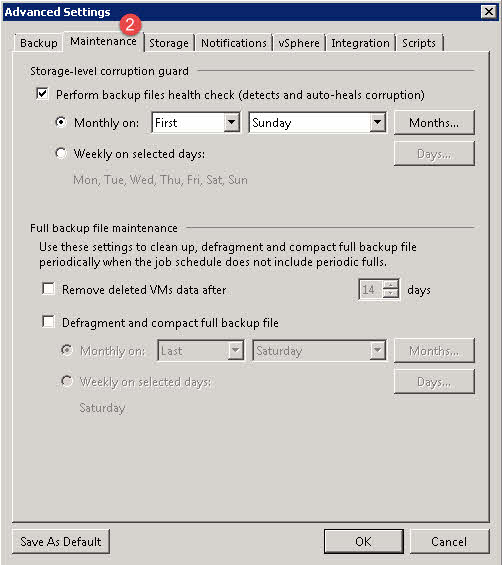
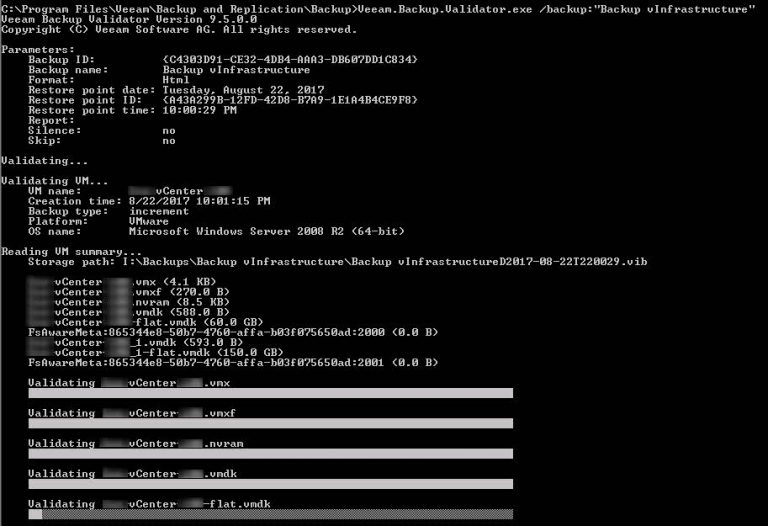
Storage-level Corruption Guard Taking backup from virtual or physical machine is a good solution to protect data and services in an organization also some administrators taking backup form backup files on another storage space, it’s absolutely prefect but not enough! If backup is corrupted during backup session or after that, the source backup and copied files will be corrupted and this is actually big risk because you can’t trust to your backup files. Veeam has a utility to check and validate backups but it should be run manually or as a script after each job, you can read more iformation about this solution on the below post: [Review]: Veeam BR Validator Command-Line Tool Also Veeam BR offers “Sure Backup” feature for checking backup files totally on a isolated environment. In addition to Sure Backup and Validator, Veeam BR has another feature to check backup files automatically at scheduled time. The feature is called “Storage-Level Corruption Guard” How It Works? When a job has finished, storage-level corruption guard will perform a CRC verification for the most recent restore point. It will validate whether the content of the backup chain blocks match the content described within the backup file metadata. If a...
Veeam Backup & Replication Best Practices Veeam Architecture team has released latest guide for administrators about “Veeam Backup & Replication Best Practices” on Gitbook. The guide is including all best practices about Veeam Backup & Replication architecture and backup environment optimization. You can find best practices about Veeam Backup & Replication on the below topics: Architecture Overview Operational Guidelines Applications Proof of Concept Guidelines Each topic has many sub-topics and you’ll find best practices for implementing backup and replication solution on vSphere and Hyper-V environments. The book is available as PDF, ePub and Mobi formats and also you be able to read the contents online. Download The Book The book is available for download on the below links: PDF ePub Mobi Also as I mentioned, the book is available for online reading on the below link: Online Reading